The Ambient Weather Falcon combines a PMVA color console, outdoor weather array and separate indoor temperature/humidity sensor. Its distinctive features are a daytime fan-aspirated radiation shield and support for compatible extra temperature, pool and soil sensors. It makes most sense where those features matter and a reliable 2.4 GHz Wi-Fi connection can support remote monitoring.
For current buyers: Ambient Weather currently sells this Falcon under SKU WS-8480A, although its product-page title and linked manual still use WS-8480. For existing WS-8480 owners: keep using the documentation appropriate to your equipment. Ambient groups both names in some support information, but the available documentation does not establish a complete hardware-change history between them. The older WS-8478/WS-8478A Falcon is a separate family; do not assume its parts or firmware apply.
As an Amazon Associate I earn from qualifying purchases. If you buy through links on this page, I may earn a commission at no extra cost to you.
Ambient Weather’s current Falcon product page and specifications identify the current package. For an alternative shopping destination, check the WS-8480A on Amazon (paid link).
Who is this product for?
Consider the Falcon if you want to monitor backyard weather on a dedicated display and add a compatible sensor for another location, a pool or soil. Its fan assists airflow through the outdoor temperature sensor’s radiation shield during suitable daylight conditions. That is a useful design feature, not a guarantee of error-free readings in direct sun or proof that it outperforms every competing station.
For a rural property, check connectivity first. The sensors communicate with the console by radio; the console uses your Wi-Fi and internet connection for cloud reporting. This is not a cellular station. Local display readings and remote access are different capabilities, and an internet outage can interrupt the latter.
This review evaluates manufacturer documentation and product compatibility; it does not report hands-on testing or measured accuracy comparisons.
What’s included and how it communicates
The documented package includes:
- An outdoor array measuring temperature, humidity, rainfall, wind speed/direction, solar radiation and UV.
- A separate TX-3110B indoor temperature/humidity transmitter.
- A PMVA color display console, which also measures barometric pressure.
- A console power adapter and instructions.
The WS-8480 manual linked by Ambient Weather specifies a 5 V adapter and three AAA backup batteries for the console, two AA batteries for the indoor transmitter, and three AA batteries for the outdoor array. The array also uses a solar panel and capacitor; this does not make it battery-free. Follow the manual’s battery recommendations for your climate.
The supplied transmitters use 915 MHz radio, not Wi-Fi. The manual specifies up to 300 feet line of sight and approximately 100 feet under typical conditions for these transmitters; walls, metal and mounting locations can reduce this. These are manufacturer ranges, not measurements from our testing or specifications for every optional sensor.
The console requires 2.4 GHz Wi-Fi for network access. Sensors send readings to the console, which forwards data to online services—not directly from each sensor to an app.
Features, expansion and current integrations
The console supports seven wireless sensor channels in total. With the included indoor transmitter using one, six remain for additional compatible sensors. Assign different channels rather than assuming every Ambient Weather accessory works with this Falcon.
- Another air-temperature/humidity location: the compatible TX-3110B manufacturer page explains the transmitter. Check the TX-3110B on Amazon (paid link) if you need an additional one; one is already supplied.
- Pool or spa temperature: the TX-3107 floating thermometer is a compatible option. Check the TX-3107 on Amazon (paid link) only if water-temperature monitoring is useful to you.
- Soil observations: the TX-3102 soil sensor reports temperature and a coarse moisture indication. Its manual describes 16 moisture levels and soil-dependent readings; do not treat it as a calibrated irrigation prescription.
Ambient Weather Network: the console can upload readings for online monitoring. Email and app-push alerts are available without AWN+, while SMS text alerts require AWN+. Account settings, connectivity and service availability affect notifications. Personal-station alerts supplement awareness; they are not a substitute for official warnings.
Weather Underground: the manual documents uploading through the console using a station ID and station key. Do not assume that every extra sensor channel will appear there simply because it appears in Ambient Weather Network.
Alexa and IFTTT: Ambient lists WS-8480 support for its Alexa weather skill, and IFTTT’s Ambient Weather service provides weather-based triggers. These are cloud/account integrations with their own capabilities and service terms; we have not tested them end to end.
Google Assistant—changed service: the former Ambient Weather integration depended on Google’s retired Conversational Actions. Ambient’s current notice describes that discontinuation, so do not buy this station expecting the old Google Assistant commands to work. Older sales copy still mentioning Google does not establish a working replacement.
For technical projects, Ambient publishes an AWN cloud API. That is not evidence of a supported local console API or direct SmartThings integration. See our Ambient Weather and SmartThings explanation for that distinction.
Setup and help for existing owners
Start with the linked manual and your equipment label. The documented WS-8480 setup uses the console’s access-point mode: hold SENSOR/WIFI for six seconds, join its PWS wireless network, then open 192.168.1.1 in a browser to configure the connection. Enter your 2.4 GHz network details and configure the reporting services you intend to use. Follow the manual for registering the station with Ambient Weather Network.
The existing Falcon-series Wi-Fi setup video remains a visual reference for older equipment. It covers WS-8478/WS-8478A as well as WS-8480; use it alongside your model’s manual, not as proof that every revision has identical menus.
Site the array before judging its readings. A combined array involves compromises between suitable temperature, rain and wind exposure. Our Sensor Siting Checklist and installation guidance explain those trade-offs. The console’s pressure-based forecast icon is an estimate, not an official forecast or safety determination.
For repairs, Ambient’s WS-8480A-ARRAY replacement explicitly supports WS-8480 and WS-8480A, but not WS-8478/WS-8478A. It is the outdoor array only. Consult the combined WS-8480/WS-8480A firmware page before attempting updates; at this review, it lists no available firmware. Do not install another Falcon model’s firmware.
Alternatives
If the Falcon’s particular sensor expansion and fan aspiration are not priorities, compare the WS-2902 family against your display, setup and monitoring needs. Similar branding does not make the families’ accessories interchangeable.
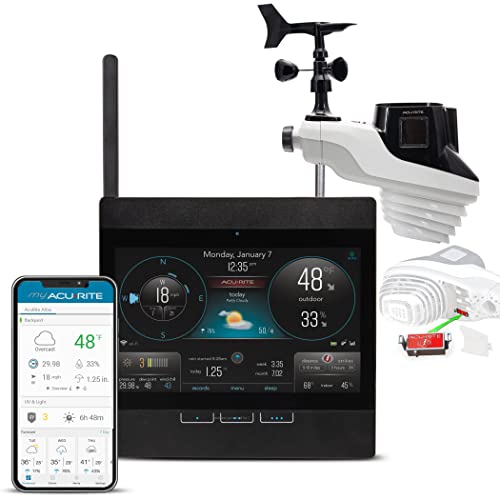
For buyers specifically interested in lightning detection, the AcuRite Atlas Wi-Fi display package with lightning detection is a different option. Check that Atlas package on Amazon (paid link). This is not a claim that it is more accurate, more durable or consistently cheaper than the Falcon. Lightning detection does not determine when outdoor conditions are safe.
Conclusion
The Falcon WS-8480A is worth considering for its combination of a dedicated display, daytime fan aspiration and compatible TX-series expansion. Confirm your network coverage and sensor needs before purchasing, and distinguish free monitoring from paid SMS alerts. Existing WS-8480 owners should check model-specific documentation and replacement compatibility rather than replacing working equipment merely because the current SKU has an A suffix.