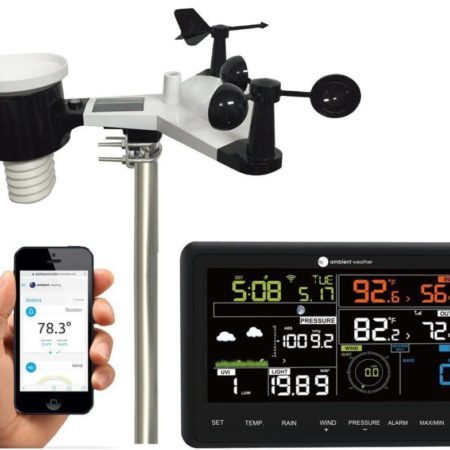
The Ambient Weather WS-2902 family combines an outdoor sensor array, an indoor display and online weather monitoring. For current buyers: the WS-2902D is the current version discussed here for new purchases. For existing owners: use the generation-specific information below for your original WS-2902, A, B or C hardware. D-specific setup methods and features do not automatically apply to earlier generations.
This article previously focused on the WS-2902C. The review below separates that legacy context from the current D model, using manufacturer documentation rather than claiming hands-on testing. The original sensor and console illustrations are preserved and labeled.
As an Amazon Associate I earn from qualifying purchases. If you buy through links on this page, I may earn a commission at no extra cost to you.
Who is the WS-2902D for?
It is worth considering for a homeowner who wants local wind, rainfall, temperature and humidity readings, plus remote access through Ambient Weather Network. Its appeal is the combination of measurements and cloud access in one system. Its limitations matter if you want extensive local data logging, extra sensors visible on the console or automation that works without internet access.
A personal weather station helps you observe conditions at your property. It does not make a weather app or official forecast unnecessary: measurements at one location and forecasts for an area serve different purposes.
For a new purchase, check the exact console revision. Ambient’s current product page identifies SKU WS-2902D. A retail title saying only “WS-2902” does not establish that the package contains a D console.
Prefer Amazon? Check the AccuWeather-branded WS-2902D-AW package on Amazon. This is the D-generation package; its AccuWeather Premium+ trial is separate from AWN+. Check eligibility and renewal terms if you choose to activate the trial.
WS-2902, A, B, C and D: which version do you have?
| Version | Important difference | Setup route |
|---|---|---|
| Original WS-2902 | Legacy console; AmbientTool has been retired. | See the original-console warning below. |
| WS-2902A | Added Wi-Fi broadcast setup mode. | Use the A/B/C awnet instructions. |
| WS-2902B | Added supported extra-sensor data forwarding to AWN. | Use awnet; extra readings are not shown on this console. |
| WS-2902C | Revised console layout. | Use awnet, not the retired AmbientTool app. |
| WS-2902D | Revised layout and browser-based Wi-Fi setup. | Use the console’s web interface; awnet is not required. |
Check the console label and your supplied manual; do not identify the console revision from the outdoor array alone. Ambient documents the generation changes in its WS-2902D manual.
Original WS-2902 owners: Ambient retired AmbientTool on January 31, 2023. Its original-console upgrade notice explains that an already connected station can continue reporting, but Wi-Fi reconfiguration becomes a problem after network changes. Do not reset a working original console simply to try newer instructions. A compatible D replacement console can be an upgrade path without replacing the whole outdoor array.
What’s included and what it measures
Like most weather stations, this kit has two main components: the indoor display console and the outdoor sensor array. The console measures indoor temperature, humidity and pressure. The array measures outdoor temperature and humidity, wind speed and direction, rainfall, UV and solar radiation; the system also provides calculated values such as dew point, heat index and wind chill.

The array sends readings by radio to the console. The console then uses your home Wi-Fi to upload them. The outdoor array is not itself a Wi-Fi device. This distinction helps when diagnosing missing readings: a sensor-radio problem and an internet-upload problem are different faults.
| Specification | Manufacturer-stated detail |
|---|---|
| Outdoor radio link | 915 MHz; up to 330 feet in open air, about 100 feet under typical conditions. |
| Console Wi-Fi | 2.4 GHz; the manual lists 80 feet in open air. This is not the array-to-console range. |
| Outdoor temperature | −40°F to 149°F with lithium batteries; narrower limits with alkaline batteries. |
| Wind speed | 0–100 mph operational range; not a guarantee of storm survivability. |
| Power and mounting | Solar-assisted array with battery backup; console AC adapter and battery backup. A mounting pole is not included. |
These are specifications, not measurements from our testing. Walls, siting and interference affect radio reception. The console does not upload on battery-only power, so backup batteries do not guarantee an uninterrupted online record. See the manual’s power, range and operating specifications.
Display, records and practical limitations
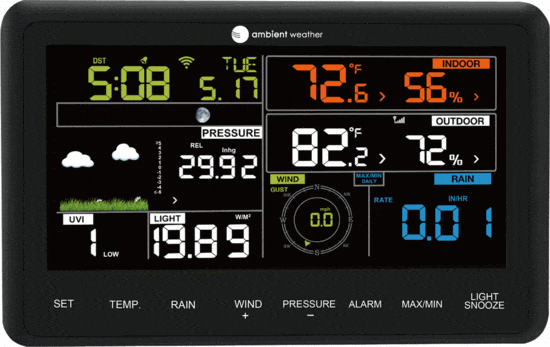
Distinguish the console’s readings and pressure-history display from the graphs and history available online. Ambient Weather Network provides remote viewing; AWN+ adds paid features. Check the current account tier for the history, graphing and alerts you need rather than assuming every advertised feature is included indefinitely.
The forecast icon uses pressure trends. It is a broad indication, not an official warning or a reliable forecast for every location. UV and solar readings are additional observations; they should not be treated as personalized advice about safe sun exposure.
An integrated array also creates a siting compromise: wind benefits from exposure, while temperature and rain have different placement needs. Use the sensor siting checklist before mounting, and see how wind speed is measured for more context. Keep the rain collector and solar surfaces accessible for maintenance rather than choosing height alone.
Setup: follow the console generation
WS-2902D: Power the console from its adapter and put it into Wi-Fi broadcast mode. Connect a computer, phone or tablet to its temporary network, open 192.168.4.1, and select your 2.4 GHz router under Wi-Fi Network. Enter the router password and apply the settings. Ambient provides illustrated browser-setup instructions. The temporary network may report that it has no internet; it is used to reach the console’s setup page.
WS-2902A/B/C: Follow Ambient’s A/B/C awnet connection guidance. awnet is the configuration app, not the dashboard for viewing your weather. Do not substitute original AmbientTool directions or assume the D web-interface instructions apply.
Original WS-2902: Use the AmbientTool retirement and upgrade information before changing a working connection.
After Wi-Fi setup, register the station with Ambient Weather Network. Weather Underground is a separate account/setup step using its station ID and key; connecting to AWN alone is not the same as configuring every weather service. Ambient also lists WeatherCloud support. Consult the WS-2902 support instructions for the service and console you actually use.
For missing data, first check whether outdoor readings still appear on the console. If they do, investigate console power, router connectivity and the selected service’s credentials. If they do not, check the array’s power and radio reception. Use model-specific troubleshooting before factory resets. For D firmware, follow the manual’s console web-interface update procedure; do not install an A/B/C file merely because it is labeled WS-2902.
Smart-home integrations: what the connections actually do
- Alexa — manufacturer-listed, cloud-based: Ambient documents an Alexa skill using data already uploaded to AWN. It is not a direct radio connection to an Echo or proof that every home device can use the readings. See Ambient’s integration support.
- Google — legacy route retired; current operation needs confirmation: Ambient’s old Assistant integration notice says the Conversational Actions route ended. Another official article describes Google Home account linking, while support also retains a suspension notice with an old September 2024 estimate. These pages do not establish successful current operation or feature parity. Confirm with Ambient before buying specifically for Google Home.
- IFTTT — supported service, indirect automation: The Ambient Weather service on IFTTT uses AWN data. Your target device must have a suitable action. Plan limits and trigger timing vary; do not assume every automation is free or immediate.
- API and Home Assistant — technical options: Ambient offers a cloud API. Home Assistant’s Ambient Weather Station integration uses cloud push and API credentials. Its documentation also describes a community local route through ecowitt2mqtt, which requires additional setup; it is not an ordinary plug-and-play Ambient feature.
For SmartThings, see what works now and why the old SmartApp instructions no longer apply. Irrigation users should read the Rachio compatibility and setup guide rather than infer native Rachio integration from Wi-Fi connectivity. These integrations have not been personally tested for this review.
Compatible extra sensors and replacement parts
For WS-2902B/C/D owners, the WH31E adds a temperature/humidity location and the WH31P adds a temperature probe. The supported extra readings pass through to AWN instead of appearing on the station console. These are optional extra sensors, not replacements for the all-in-one array. Confirm your console revision and available sensor channel first.
If those capabilities meet your needs, compare WH31E on Amazon and WH31P on Amazon. The probe’s waterproof tip does not mean its transmitter should be left unprotected outdoors; follow Ambient’s mounting guidance.
Compatible PM2.5 sensors are another supported pass-through option, but do not assume every Ambient accessory works with this console. Check the model-specific list before buying lightning, leak or soil-moisture hardware.
For a failed outdoor assembly, Ambient lists the WS-2902-ARRAY replacement, identified on the unit as WH65B. For a console upgrade, consult the WS-2902D replacement console and original-console upgrade guidance. Diagnosis should come before buying an entire replacement station.
If troubleshooting confirms that the outdoor array needs replacement, compare the WS-2902-ARRAY replacement on Amazon. This is the outdoor assembly only, not a complete station or replacement console.
Advantages, limitations and alternatives
- Strengths: a broad set of home-weather measurements, an indoor display and AWN remote viewing; useful extra-sensor options on supported revisions.
- Limits: integrated-array siting compromises, a basic console, cloud dependencies for remote services, and extra readings that do not appear locally on the WS-2902 console.
- Allow for: a suitable mounting solution, batteries, cleaning access and any optional paid service features.
If your main concern is a better console and local records, the WS-2000 is a relevant comparison: Ambient documents a TFT display, additional sensors visible locally and SD-card history export. That is a concrete reason to compare a different model, rather than assuming a higher price automatically delivers more accurate measurements.
Conclusion
The WS-2902D is a reasonable candidate for home weather monitoring when its display, siting requirements and cloud features match your needs. Older owners should identify the console generation before following setup advice or replacing parts. For a new station, verify the actual revision with the seller; for an existing station, a compatible console or array may solve the problem without replacing everything.