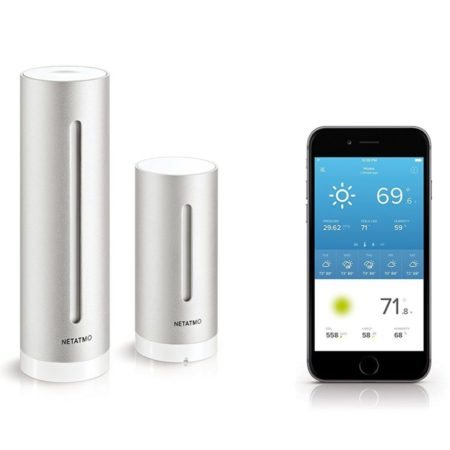
Netatmo makes the most sense as a modular indoor/outdoor environmental-monitoring system. The base station combines outdoor temperature and humidity with indoor measurements including CO₂. Rain and wind require separate accessories, and normal access through the Netatmo Weather app depends on an account and an internet connection.
That can suit a homeowner interested in several rooms and the conditions outside. It is a less natural choice if your priority is a dedicated weather display, an entirely local system, or wind and rainfall included in one complete package.
This review uses manufacturer and integration documentation; it does not claim hands-on testing. It covers both the older silver station pictured in this article’s preview image and the newer Weather Station ORIGINAL range.
Current ORIGINAL and older silver stations
Netatmo currently lists the Weather Station ORIGINAL, second generation, in Sand and Mint in its UK/European range. The older silver Smart Home Weather Station also remains listed in the UK store. An unavailable Amazon listing does not establish that the entire product family is discontinued.
For new purchases, check the exact package and market. The current UK ORIGINAL base package includes an indoor module, an outdoor module, a USB power adapter, an outdoor mounting accessory and two AAA batteries. Earlier hardware can have different battery requirements; existing owners should follow their own module’s label and manual.
View Netatmo’s current ORIGINAL package and specifications — UK store. US availability and an exact current ORIGINAL Amazon US package were not verified for this review. Do not assume an older silver listing supplies the newer model.
What is included, and what requires an accessory?
| Hardware | Measurements | Included or optional? |
|---|---|---|
| Main indoor module | Temperature, humidity, pressure, CO₂ and sound level | Included; also connects the system to your network |
| Outdoor module | Temperature and humidity | Included |
| Additional Indoor Module | Temperature, humidity and CO₂ in another room | Optional; up to three additional modules |
| Smart Rain Gauge | Rainfall | Optional; one per station |
| Smart Anemometer | Wind speed and direction | Optional; one per station |
The additional indoor module is not another complete base station: it does not duplicate every measurement of the main module. Netatmo specifies that its Additional Indoor Module requires a Smart Weather Station or Weather Station ORIGINAL.
Choose expansion around an actual question: another room’s temperature and CO₂, rainfall at your property, or wind at a suitably exposed location. The rain gauge and ultrasonic anemometer need the station and appropriate mounting positions. Ultrasonic operation alone is not evidence of universally better accuracy.
Count the base, optional modules and mounting needs when comparing total cost. None of these accessories turns the system into a soil-moisture or leaf-wetness station.
Radio, Wi-Fi and cloud: three different connections
The basic route is outdoor/accessory module → radio → indoor base → home Wi-Fi and internet → Netatmo account/app. Your phone does not receive the outdoor module’s radio transmissions directly.
The base uses 2.4 GHz Wi-Fi. That is separate from the module radio link: a quoted module range is not the distance at which your phone can connect, and walls or an awkward mounting position can reduce reception. Check the regional hardware specification when buying imported equipment.
Netatmo records standard station readings at five-minute intervals. That is not a guarantee that every app notification or connected service refreshes immediately. Its anemometer separately samples every six seconds and aggregates readings over five minutes, according to the manufacturer’s specifications.
What happens without internet?
Normal Netatmo app access and cloud integrations require connectivity. A powered station can buffer measurements during a Wi-Fi outage: Netatmo support documented that behavior for the earlier station, with storage duration depending on the number of modules. That is temporary storage, not a standalone display or a guarantee of unlimited offline history. The exact buffer capacity of every ORIGINAL revision has not been independently established here. See Netatmo’s support explanation.
Compatible Apple Home hardware provides a separate, limited local access route. Netatmo specifies same-network access or an Apple home hub for remote access. This does not make the full Weather app, its history or every accessory independent of the cloud.
Netatmo currently advertises its Weather app without a subscription. That does not remove its account/cloud dependencies or cover separate third-party service plans. For records you need to keep, Netatmo documents CSV/XLS downloads from its web app. Export important history before replacing or removing equipment.
Which integrations work now?
| Service | Current position and limitation |
|---|---|
| Apple Home/HomeKit | Current, hardware-dependent. Netatmo’s June 2026 guidance supports Station V3 or later and all ORIGINAL stations; V1/V2 are excluded. Rain and wind are not exposed in Apple Home. |
| Alexa | Current, limited. Netatmo documents voice access to station readings. Voice reporting alone is not automation. |
| Google Home | Current, limited. Documented voice/display access through the Legrand–Netatmo–Bticino connection; do not assume every measurement is available. |
| Home Assistant | Current, cloud polling. The documented Netatmo integration requires internet access and a Netatmo account. It is not the equivalent of a local Ecowitt data path. |
| IFTTT | Current, indirect cloud connection. Supported triggers/actions and account-plan limits determine what an automation can do. |
| SmartThings | No equivalent current direct integration verified here. Old instructions should not be treated as current. IFTTT offers an indirect connection with its own dependencies. |
| Weather Underground | Native partnership discontinued in 2018. There is no current automatic upload route established by the old instructions. |
Before buying for Apple Home, check Settings → Manage my Home → main module → Information in the Netatmo app. Use Netatmo’s hardware eligibility and supported module measurements lists rather than judging by the silver casing.
For other platforms, consult the current Alexa instructions, Google Home compatibility page, Home Assistant documentation and IFTTT service. The IFTTT–SmartThings connection is an intermediary, not a restored native integration. Our home-automation guide explains the broader local-versus-cloud choice.
Netatmo explicitly confirms the Weather Underground partnership ended. Its Weathermap and developer APIs remain separate options. If uploading is essential, check the Weather Underground connection guide before buying. Participating in a personal weather-station network does not imply compatibility with every network.
Indoor readings and forecasts: useful, with limits
CO₂ adds a useful room-monitoring dimension, but it is not a measurement of all indoor pollution. Temperature, humidity and sound readings also should not be interpreted as medical advice, a guarantee of healthy conditions, or a certified hearing-safety assessment.
Distinguish measured conditions from supplied information. The app’s seven-day forecast comes from an external weather-data service. Netatmo staff also explain that ORIGINAL pollen and UV information uses external weather-service data; the outdoor module is not measuring pollen or UV at your home.
Personal observations and notifications supplement awareness. They do not replace official severe-weather warnings or protective action. For example, follow NWS lightning guidance, rather than waiting for a station notification.
Owner checks before replacing hardware
- Identify the hardware. Check the main module’s version, accessory identity and battery compartment. Do not apply one generation’s power requirements to every station.
- Separate network and radio problems. If the entire station is unavailable, check base power, home Wi-Fi and internet. If only one module is missing, begin with that module’s batteries and its radio path to the base.
- Follow the documented setup path. Netatmo’s station setup instructions require a suitable 2.4 GHz network and wall power for the base. Public captive-portal networks are not supported.
- Check placement before questioning accuracy. Direct sun can heat a temperature module. Avoid placing it where reflected heat distorts the conditions you want to observe. Netatmo’s temperature guidance and our Sensor Siting Checklist explain the distinction between convenient mounting and representative exposure.
- Protect history and use model-specific support. Export records before removing equipment from your account. Do not jump to an undocumented factory reset because a reading is delayed.
Who should consider Netatmo?
Consider it when indoor measurements, several rooms and app-based history are central to your needs, and you accept the network/cloud dependencies. Existing owners may gain more from correcting placement or adding one relevant module than replacing the whole system.
Choose a different architecture when you need a conventional console, an entirely local integration, or a complete outdoor wind-and-rain package from the outset. Our WS-2902 generation guide provides that alternative context without treating the systems as interchangeable.
For Netatmo, identify the exact package and required integration first. Then decide whether its combination of indoor and outdoor monitoring justifies the full system cost.