As an Amazon Associate I earn from qualifying purchases. If you buy through links on this page, I may earn a commission at no extra cost to you.
The AcuRite 02064 is worth considering mainly for its local display or an existing PC Connect setup. If you are buying a station primarily for remote monitoring, compare a direct-to-Wi-Fi model before choosing this older system. Its wireless outdoor sensor does not mean the console connects directly to your router.
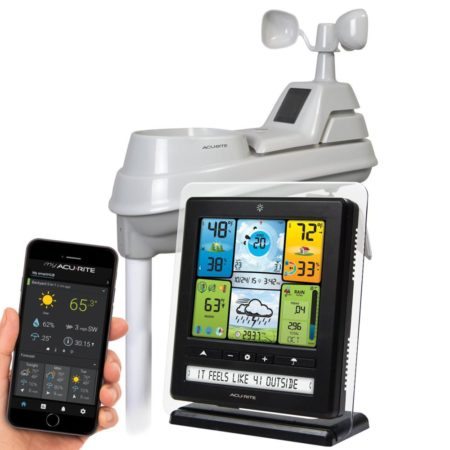
Reviewed against manufacturer documentation: September 6, 2026. This is a researched review and owner guide, not a hands-on accuracy test. The original product photograph shows an older app interface; see the current connection guidance below.
AcuRite 02064 review: who should buy it?
My recommendation is to decide how you want to use your weather data before comparing prices. A working station already in your yard can have more value than its age suggests. A bargain listing is less attractive if getting it online adds a computer, software troubleshooting and ongoing service costs.
- Keep or consider it: you want a dedicated display, already have a working 02064, or have confirmed that its PC workflow fits your needs.
- Compare alternatives first: you want unattended internet sharing without a computer, are buying mainly for a current phone app, or need guaranteed compatibility with your computer.
- For a used purchase: ask the seller to demonstrate live outdoor readings and the USB connection. Check the exact model label, supplied adapter, sensor and return terms.
Check the AcuRite 02064 listing on Amazon (paid link). Availability, condition and included accessories depend on the listing.
What does the AcuRite 02064 measure?
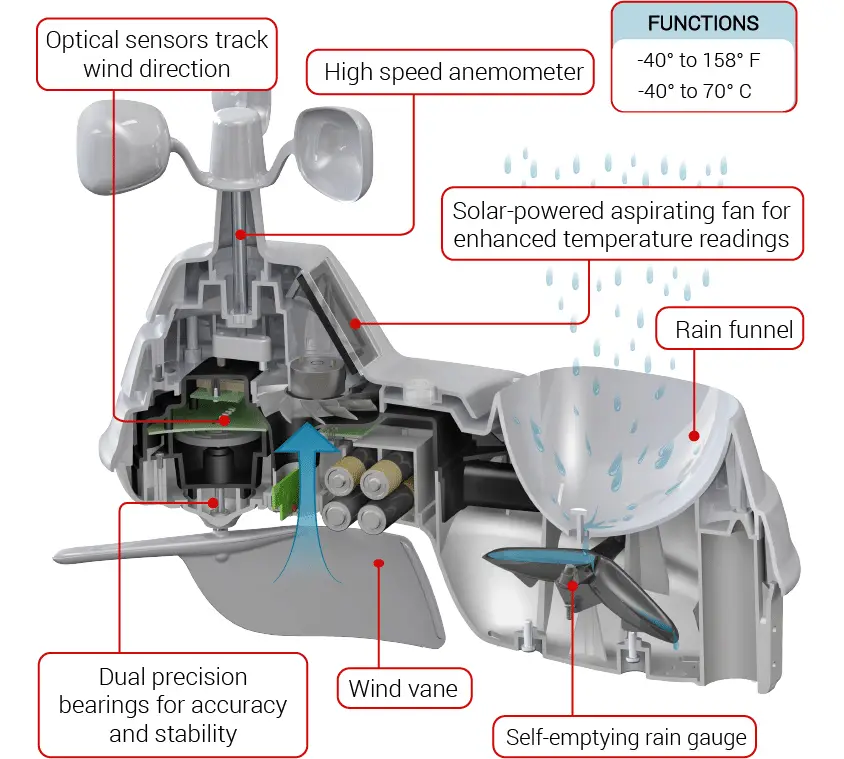
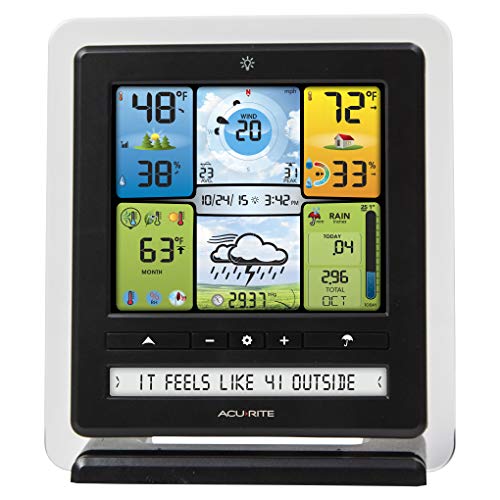
The outdoor 5-in-1 array measures temperature, humidity, wind speed, wind direction and rainfall. The indoor display provides local readings, pressure information and a forecast icon. The documented sensor-to-display range is up to 330 feet (100 meters); obstructions can reduce it. See the 02064C manual.
| Feature | Practical implication |
|---|---|
| Indoor console | Useful for checking conditions without opening an app. |
| PC Connect internet path | Requires a USB-connected computer for the documented online workflow. |
| Windows software | Legacy software; verify compatibility before buying for remote access. |
| CSV records | Useful for reviewing historical readings; logging intervals differ from live updates. |
| All-in-one outdoor array | Choose a location that balances exposure, access for cleaning and a stable mount. |
Accuracy needs evidence. We have not measured this unit against reference instruments, so we do not assign an accuracy score or claim it outperforms competing stations. A backyard observation also answers a different question from a regional forecast. Use the readings to understand local conditions, without treating a forecast icon as a guarantee.
Does the AcuRite 02064 have Wi-Fi?
The 02064 uses the legacy PC Connect route: the display connects to a computer by USB. AcuRite’s current instructions say the computer must remain powered on and online to send readings to AcuRite NOW. Plan around that dependency if you want to check the station while away. AcuRite’s legacy-display connection instructions.
Windows compatibility and software download
AcuRite identifies PC Connect as a legacy product. Its download page lists Windows 8, 8.1 and 10, and specifically notes potential problems on Windows 11. That is a compatibility limitation, not a reason to downgrade to an older operating system. For a new purchase, confirm a supported, secure setup with AcuRite first. Get the official PC Connect download and requirements.
For the 02064/06039 display, there is no USB Mode setting to select. AcuRite says to open PC Connect and attach the supplied USB cable. Instructions telling you to select Mode 3 refer to other models. Check AcuRite’s model-specific USB guidance.
AcuRite NOW and Weather Underground
For AcuRite NOW, the current manufacturer workflow adds the display as a legacy device and then links its sensor. In PC Connect, enable weather sharing and enter the full 12-digit display ID; the app’s legacy-device setup asks for its last six digits. Follow the current AcuRite NOW instructions rather than relying on screenshots of the older My AcuRite app.
AcuRite’s current NOW+ instructions include a PC Connect display path for Weather Underground and require a NOW+ subscription for that route. Older PC Connect documentation describes a different sharing setup. Verify which route applies to your account before assuming internet sharing is free or that older instructions still work unchanged. Read the current NOW+ Weather Underground requirements.
Can it export weather data to CSV?
Yes. PC Connect supports manual and scheduled CSV transfers. AcuRite says the stored records use 12-minute intervals; that is not the same as saying every sensor measures only once every 12 minutes. You can append transfers to one file or use dated files. See the data-transfer instructions.
AcuRite 02064 setup and manual
- Check the model number and use the matching manual; AcuRite groups several 02064 variants on its support page.
- Pair the display and sensor before permanent mounting, with their A-B-C switches matching.
- Choose an open location away from heat sources and sprinklers. The manual specifies at least five feet above ground; level the array and orient its solar cell south as instructed.
- Set the display’s time and units, then check local readings before configuring USB or online sharing.
Compare the manufacturer’s packing list with the seller’s actual photos, especially for used equipment. The small solar panel powers an internal fan; it does not replace the sensor’s batteries. Open the official 02064C manual (PDF).
For help choosing a location, read our weather station installation guide. Think about how you will reach the sensor for maintenance before choosing a mount.
AcuRite 02064 troubleshooting: start with the failed connection
Separate local readings from online sharing. If outdoor measurements appear on the console but not in the app, replacing the outdoor sensor is not the first step. Work through the connection that is actually failing.
| Symptom | First check |
|---|---|
| Outdoor readings are missing on the console | Check power, matching channels and placement using the model manual before attempting online setup. |
| PC Connect cannot detect the display | Reseat the USB cable at both ends and try another USB port. |
| The computer detects the display but has no new data | Check the Data Received status and allow a few minutes for readings to arrive. |
| Local readings work but the app does not update | Check that the computer is awake and online, sharing is enabled, and the device and sensor are linked to your account. |
| CSV transfers fail while you are reviewing a file | Close the destination CSV before the next transfer; an open file can prevent PC Connect from writing data. |
These checks follow AcuRite’s PC Connect status guide and CSV troubleshooting guidance. For broader symptoms, our AcuRite reset guide is a starting point; use the model manual for the exact procedure and save important data before resetting.
Replacement sensors and parts
AcuRite lists the 06014M replacement sensor and 11174-2028AD adapter for the 02064 family. Its support page also identifies wind cups, a wind vane and mounting parts. The replacement temperature/humidity board has an older-unit compatibility warning, so confirm your revision before ordering. Check the official 02064 parts list. View the AcuRite 06014M replacement sensor on Amazon (paid link).
Repair can be the better purchase when one component has failed and the rest of the system meets your needs. Compare the cost and confirmed compatibility with a complete replacement; a part number on a support page does not establish current stock. Our AcuRite parts guide provides additional background.
Alternatives if you want simpler remote monitoring
The Ambient Weather WS-2902 family is worth comparing if the always-on computer is the deciding drawback. Ambient’s documentation describes a Wi-Fi console that connects to the router without a computer running continuously. Setup differs by console revision, so check the exact version before ordering. Ambient’s WS-2902 support information.
Read our Ambient Weather WS-2902 review or check the WS-2902 listing on Amazon (paid link). For a wider comparison, use our home weather station buying guide.
If you only need indoor and outdoor temperature, start with an indoor/outdoor thermometer guide instead. There is little value in paying for wind and rain measurements you will not use.
Frequently asked questions
Is the AcuRite 02064 discontinued?
AcuRite still provides a 02064 support page, manual and parts references, while describing PC Connect as legacy software. Those facts do not confirm current production or retailer stock. Ask the seller whether a unit is new, used or old stock and confirm warranty eligibility before buying.
Does it work without internet?
You can use the local console independently of online sharing. Remote access is a separate requirement: the documented PC Connect workflow depends on the connected computer. Decide whether you need local readings, CSV records or an app before choosing your setup.
Will PC Connect run on a Mac or Windows 11?
The current AcuRite download page offers a Windows version and warns about Windows 11 compatibility. It does not provide a current Mac download. Confirm your specific operating system with AcuRite; do not assume the old product description guarantees compatibility.
Should I replace a working 02064?
Not solely because it is older. Keep it if the readings and workflow meet your needs. Consider replacing it when a repair is uneconomical or when remote monitoring requires a setup you no longer want to maintain. The strongest reason to upgrade is solving a specific limitation.
Our verdict: useful as an existing local weather station, but a conditional choice for a new buyer. Confirm the computer, service and sensor requirements before spending money on remote access. View the AcuRite 02064 listing on Amazon (paid link).