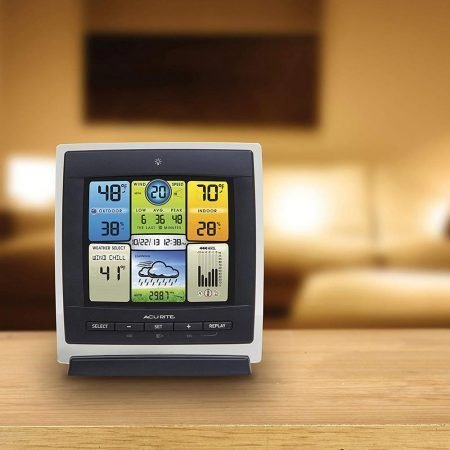
The featured photograph shows an earlier AcuRite color display. Current packages and displays differ.
As an Amazon Associate I earn from qualifying purchases. If you buy through links on this page, I may earn a commission at no extra cost to you.
The right AcuRite weather station depends on what you want to measure and where you want to see the readings. Iris covers the usual home-weather measurements, Atlas adds UV and light intensity, Optimus includes lightning detection in its outdoor sensor, and Notos is a simpler option for temperature, humidity and wind speed.
Start with the sensor family, then check the exact display and package number. An AcuRite station with a wireless outdoor sensor does not necessarily have Wi-Fi or app access. Existing owners should also check compatibility before replacing a working console or sensor.
This guide compares manufacturer documentation and identified buying options. It does not claim hands-on testing of these packages.
Choose by the measurements you need
| Family | Useful when you want… | Important limitation |
|---|---|---|
| Iris — 5-in-1 | Temperature, humidity, wind speed/direction and rainfall | Connectivity and lightning support depend on the display/package. Older and redesigned 2026 sensors are both in circulation. |
| Atlas — 7-in-1 | Those core measurements plus UV and light intensity | Lightning requires the Atlas lightning module; some bundles include it. An HD screen alone does not establish Wi-Fi capability. |
| Optimus — 6-in-1 | Core measurements plus built-in lightning detection and the newer NOW-connected display system | It does not add Atlas’s UV/light measurements. Do not buy it as a drop-in sensor for an Iris/Atlas display or Access. |
| Notos — 3-in-1 | Local temperature, humidity and wind speed without needing a connected display | No rainfall or wind direction measurement; the recommended kit has no built-in Wi-Fi. |
These measurement distinctions come from AcuRite’s current family guide and the individual products below. A higher sensor count does not automatically make a station the better fit.
If you only need indoor and outdoor temperature and humidity, a basic thermometer/hygrometer may be enough. You do not need to pay for a rain gauge or anemometer you will not use.
Iris: a practical starting point for home weather
Iris is the family to consider when you want rainfall and wind direction as well as temperature, humidity and wind speed. The same family offers local displays and several different connected displays, so compare the complete kit rather than buying on the “5-in-1” name alone.
Current manufacturer option: Iris Direct-to-Wi-Fi kit 01544MCBA1BK. AcuRite identifies this package as including its redesigned 2026 Iris sensor. It describes larger vents, an LED transmission indicator and a straight-armed anemometer. These are revisions to the outdoor sensor, not features to assume on every older Iris listing.
The kit’s 06100M display provides a local readout and a connection to AcuRite NOW through home Wi-Fi. It is not one of the Iris displays listed for showing lightning data. If lightning is a requirement, compare the supported display and separate detector before ordering—or consider the complete Atlas or Optimus packages below.
View the current Iris 01544MCBA1BK package and manufacturer specifications.
Amazon model caution: the 01544MCB Amazon listing checked for this guide does not establish that it includes the redesigned 2026 sensor. Do not treat that listing as the exact 01544MCBA1BK package. The manufacturer destination is the clearer buying path when the revised sensor is the reason for your purchase.
An older Iris system can still be useful for local measurements. If you already own one, compare the cost of a compatible repair or display upgrade with replacing the entire station. Our AcuRite replacement-parts guide explains why exact part identification matters.
Atlas: when UV and light measurements matter
Atlas adds UV and light intensity to the core weather measurements. That makes it a more relevant choice than Optimus for someone specifically interested in those readings; it is not a claim that Atlas is universally more accurate or reliable.
Package to consider: Atlas 01001M Direct-to-Wi-Fi bundle with lightning detection. AcuRite’s manufacturer bundle includes the outdoor sensor, Wi-Fi display, power adapter and lightning detector. Amazon currently labels its corresponding offer 01001MCB. Check those included components, because other Atlas packages use non-connected HD displays or omit lightning detection.
Atlas lightning detection uses a separate module fitted to the outdoor sensor. It is included in this recommended package, but it is not included merely because a product says “Atlas.”
View the Atlas manufacturer package and documentation. Check the Atlas 01001MCB Wi-Fi and lightning package on Amazon (paid link).
AcuRite also lists an Atlas wind-extension accessory and replaceable sensor components. Those are useful repair/siting options, not a promise that every AcuRite add-on works with every Atlas display. Use the Atlas sensor information and exact compatibility listing before buying parts.
Optimus: built-in lightning and the newer display system
Package to consider: Optimus 01216MCB with Wi-Fi HD display. Its 06050M outdoor sensor measures temperature, humidity, wind speed, wind direction, rainfall and lightning. The paired 06188M display connects to AcuRite NOW. It is a sensible option if you want those measurements together and prefer this newer display/app setup.
Optimus does not include UV or light-intensity measurements. Its outdoor sensor is also not an upgrade to plug into your existing Access, Iris or Atlas receiver. Treat it as a different system.
The outdoor sensor uses four AA batteries or a compatible separately purchased power accessory. The HD console uses its supplied power adapter; the optional 06187M power base is separate. Do not assume batteries in the outdoor sensor keep the indoor display or your router running during an outage. The 01216MCB/06188M reference guide explains the console’s controls and records.
AcuRite advertises a limited lifetime warranty for Optimus, but this is not a lifetime serviceability guarantee. Its warranty terms exclude specified consumable components, including the temperature/humidity module and several exposed moving or rain-collection parts.
Before buying for Weather Underground: Optimus’s documented sharing route uses paid AcuRite NOW+, rather than an assumption of free direct uploading. Read the connectivity section below if this is important to you.
View the Optimus 01216MCB manufacturer package and manuals. Check the Optimus 01216MCB HD-display package on Amazon (paid link).
Notos: simpler local readings without rain measurement
Package to consider: Notos 00589MCB with color display. This is the modern retail naming of the 00589 line discussed in the original guide. Its outdoor sensor measures temperature, humidity and wind speed. The display adds indoor readings, pressure information and records, with a tabletop or wall-mounted arrangement.
Choose it when those readings are enough and you do not need built-in app connectivity. It does not measure rainfall or wind direction, and the complete kit does not include a Wi-Fi gateway. Someone planning to expand into rain measurement later should compare Iris before buying.
View AcuRite’s Notos 00589MCB specifications. Check the Notos 00589MCB package on Amazon (paid link).
AcuRite’s 00589 support page groups the older 00589/00589M and 00589MCB identifiers and provides the manual and replacement-sensor reference. Current retail naming does not make every older console identical.
Connectivity: check the display, app and ongoing cost
Local readings: a compatible sensor and display can provide local observations without requiring a cloud subscription. Wireless sensor communication and Wi-Fi are different links in the system.
AcuRite NOW: this is the current app to investigate for supported connected equipment. AcuRite has published NOW setup paths for Optimus and legacy Iris/Atlas Direct-to-Wi-Fi devices and Access. Some older product and marketing pages still describe My AcuRite or say NOW is only for Optimus. Follow the current device-specific setup guidance, not an old app screenshot.
AcuRite NOW+: the paid tier currently advertises 365 days of history instead of 30 and a Weather Underground sharing route. AcuRite lists $1.99 monthly or $19.99 annually; confirm the current plan and activation terms before subscribing. The NOW+ product information and sharing instructions explain the pass-key and Weather Underground account requirements. The latter covers supported Bluetooth-enabled displays, legacy Direct-to-Wi-Fi displays and Access.
Weather Underground-only displays: these are a separate route. AcuRite still distinguishes Iris packages such as 01540, 01541 and 01208 from displays that connect to NOW. Do not assume “Wi-Fi” means both services, or that the NOW+ requirement applies to every historical direct-upload method. Check the exact display in AcuRite’s connected-station catalog.
Remote monitoring needs working power, an internet connection and the relevant service. AcuRite’s current NOW FAQ says there is no desktop version available. Do not buy based on an old browser-dashboard promise or an unspecified smart-home logo. Confirm your required integration and data access first. Our AcuRite Wi-Fi guide separates setup methods by hardware.
Existing owners: repair or upgrade before replacing everything
Record the model number on the display and outdoor sensor separately. AcuRite’s compatibility charts list different receivers and accessories for Optimus, Atlas, Iris and Notos. Shared branding, radio frequency or similar appearance is not proof that two components pair.
For lightning, Atlas uses its 06075M module. Iris needs a supported lightning-data display and the separate 06045M detector; ordinary Iris consoles do not gain lightning readings simply by adding that sensor. Optimus includes lightning detection in its own sensor system.
Legacy Access owners: AcuRite lists Access as discontinued, but publishes a NOW connection procedure. Its sensor compatibility list identifies supported devices and a limit of seven sensors. That is useful for an existing installation; it is not a reason to buy an old Access hub expecting universal compatibility or guaranteed future service. Optimus is not an Access sensor.
The original guide also covered these older model identifiers:
- 00829: a basic temperature/humidity and pressure-display system, not a wind/rain station. AcuRite still lists the 00829A1 version and manual; do not call the whole line discontinued.
- 01500/01515: a legacy Iris/5-in-1 weather center. Keep its local measurement and Weather Ticker context, but do not assume its old display gains the connectivity of a new kit. AcuRite retains the 01500/01515 manual and parts information.
- 01604M: another Notos/3-in-1 display package. The current manufacturer catalog lists 01604A2. It belongs in the same basic measurement category, not a second “best” tier based on screen styling.
For a connection or reading problem, use the model-specific reset guide before purchasing replacements. Owners of PC Connect equipment can also consult the AcuRite 02064 legacy review and the existing professional weather-center review for their original equipment context.
Installation and limits matter as much as the model
Allow room for good sensor placement before choosing a station. Walls, trees, pavement and nearby heat sources can distort the conditions you measure. An all-in-one array also requires a compromise between the preferred locations for wind, temperature and rainfall measurements. Use our Sensor Siting Checklist and installation guidance.
None of these stations is maintenance-free. Keep wind components moving freely, inspect rain collectors where fitted and follow the relevant battery and cleaning instructions. Battery-runtime claims apply to particular components and conditions, not a guarantee for the entire station. See our weather-station maintenance guidance.
A forecast icon or a user-set station alarm is not an official severe-weather warning. Lightning detection is supplementary awareness, not proof that outdoor conditions are safe. If you hear thunder, seek suitable shelter rather than waiting for a detector notification; follow NWS lightning guidance.
When to look beyond AcuRite
Consider another system if your essential requirement is a verified local-data interface, a particular automation platform, extensive additional sensors or data access the chosen AcuRite package does not document. Start with our home weather-station buying guide and compare those requirements explicitly.
For irrigation, check the actual data route in our Rachio compatibility guide. A station’s Wi-Fi connection alone does not establish that it supplies the information your controller needs.
For most buyers, the decision is straightforward: choose the measurements first, then the exact display, connectivity and ongoing service requirements. Existing owners should make the same comparison against a verified repair or upgrade before discarding usable equipment.