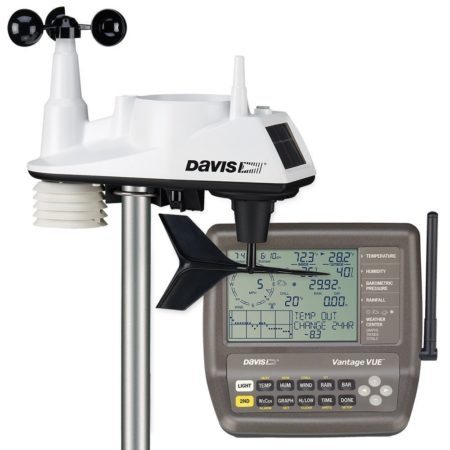
Already own a Davis 6250? The original Vantage Vue sensor suite and LCD-console information below still applies to your equipment. Buying new? Davis’s current 6242 package pairs the Vantage Vue outdoor sensor suite with the WeatherLink Console 6313. It is not the same console experience as the old 6250 kit.
Vantage Vue makes sense when you want a compact outdoor station, a dedicated indoor display and a supported parts ecosystem. Its main compromises are combined-sensor siting and the difference between local display features and paid cloud data tools. This review evaluates documented capabilities; it does not claim hands-on testing.
As an Amazon Associate I earn from qualifying purchases. If you buy through links on this page, I may earn a commission at no extra cost to you.
Featured photograph: Legacy 6250 package with the original LCD console; not the current WeatherLink Console.
Which Vantage Vue package are you looking at?
| Package | Outdoor equipment | Console and connection path |
|---|---|---|
| 6250 — legacy package | Vantage Vue sensor suite 6357 | Original LCD console 6351. Online/computer access requires an appropriate separate logger or receiver arrangement. |
| 6242 — current package | Vantage Vue sensor suite 6357 | WeatherLink Console 6313, with built-in Wi-Fi for its online functions. |
| 6313 — console only | No outdoor sensor suite included | A possible display/online upgrade for compatible existing Davis wireless equipment; match the regional radio version. |
Davis’s legacy package specifications and current package specifications identify the components separately. A listing that says “Vantage Vue” without identifying the console is not enough to establish what you will receive.
What the station measures
The outdoor suite measures temperature, humidity, wind speed and direction, and rainfall. Indoor temperature, indoor humidity and barometric pressure come from the console. Dew point, wind chill and heat index are calculated values, not additional outdoor sensors.
The Vue suite does not include UV, solar-radiation or soil sensors. A console’s ability to display other Davis measurements does not mean the standard Vue package measures them. Expansion requires supported additional hardware, rather than plugging arbitrary sensors into the Vue housing.
Davis specifies outdoor temperature measurement from −40°F to 150°F and 0.01-inch rain tips for the US rain cartridge. Its specification tables give different update intervals: wind is approximately 2.5–3 seconds, outdoor temperature 10–12 seconds and pressure one minute. “Every reading every 2.5 seconds” is an overstatement. These are manufacturer specifications, not measurements from our testing. Davis specifications
Radio, power and installation
The outdoor sensor uses Davis radio to reach the console; it does not join your Wi-Fi network. Davis rates the link for up to 1,000 feet in unobstructed line of sight. Buildings, terrain and interference reduce practical range. Check reception at the intended locations before fixing the mount permanently.
Solar power applies to the outdoor suite: a solar panel charges its supercapacitor, with a CR123 lithium battery providing backup. The current console uses its supplied AC adapter and has a rechargeable backup battery. That does not keep your router or internet service running during an outage.
The integrated construction reduces separate sensor mounting, but wind, temperature and rain cannot each be positioned independently. Use an open, level location with suitable solar exposure, away from artificial heat and obstacles. A high roof position is not automatically best for every measurement, and the rain collector must remain accessible for cleaning. Our Sensor Siting Checklist explains the residential compromises.
Allow for a suitable pole or tripod; the standard package’s mounting hardware is not a complete site installation. Follow the sensor-suite manual. The current quick-start guide recommends at least 10 feet between the receiver and sensor during initial reception testing. Installation time depends on your mounting work.
Current 6242: WeatherLink Console and ownership costs
The 6313 replaces the old keypad interface with a color touchscreen, configurable displays and local history. It receives sensor readings without Wi-Fi or a WeatherLink account. Its 2.4 GHz Wi-Fi connection supports firmware/time updates and, when connected to WeatherLink.com, online functions. It does not require a separate WeatherLink Live to upload. Console manual
Before buying: local use and basic online viewing are different from paid cloud analysis. A free WeatherLink account provides current-condition viewing; advanced cloud history and export involve paid tiers. Davis’s supported spreadsheet export from this console is through WeatherLink.com with Pro or Pro+. The console does not provide direct WeatherLink PC downloads, and its microSD slot is not a user data-export facility. Include any required recurring service in your budget. Cloud features · Export limitations · Console FAQ
For the complete current kit, see Davis’s 6242 product page and package details, or check the Davis 6242 Vantage Vue with WeatherLink Console on Amazon (paid link). Check the regional version and seller’s current offer before ordering.
Legacy 6250: what remains useful
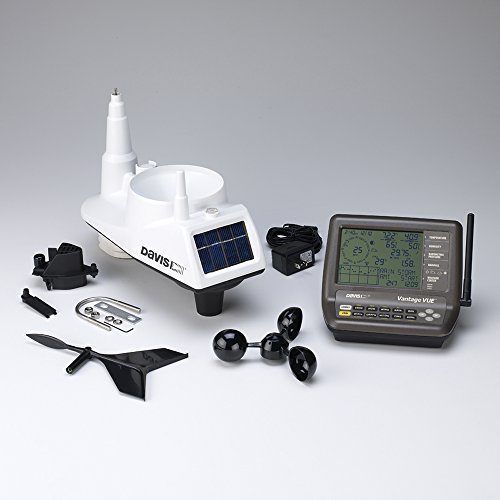
The 6351 LCD console has physical buttons, a backlight, historical graphs and yesterday-comparison functions. Its history is not simply “25 days of everything”: available graph periods depend on the measurement. The original console can operate from its adapter or three C batteries. These are legacy-console features, not descriptions of the 6313 touchscreen. Legacy specifications
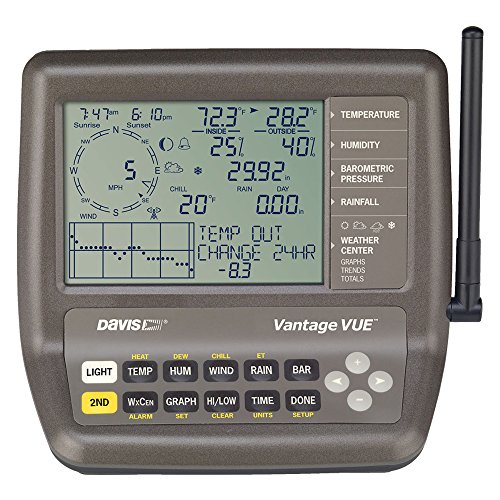
A working 6250 does not need replacing just because the current bundle changed. Davis documents the original console plus USB logger/computer arrangement. Check the exact logger and software requirements before changing an existing setup.
If you specifically want a new display and WeatherLink connectivity, the 6313 console can receive a compatible Vue suite. Confirm matching regional radio versions first. The cloud/export costs above still apply, and a working local PC-logger workflow does not automatically transfer to the new console. Check the WeatherLink Console 6313 on Amazon (paid link)—console only, not a complete station.
Davis also documents retransmission from an older console to a WeatherLink Console. For the original assembly/display setup, the existing Davis installation video remains useful; its older console instructions should not be applied to the 6313.
Maintenance, sharing and limitations
Keep the rain collector and debris screen clear and inspect the moving wind parts. Davis maintains a Vantage Vue replacement-parts range, including model-specific wind cups. Serviceability is a reason to consider the ecosystem, not proof of a particular lifespan or superior accuracy.
WeatherLink supports a configured Weather Underground sharing path; the outdoor suite does not upload there by itself. Use our Weather Underground connection guide to distinguish your receiver/service arrangement, and Davis’s upload guidance for the relevant account settings.
Alarms and forecasts are not official emergency warnings. Console thresholds can flag measured conditions, but they cannot establish that a property or outdoor activity is safe. On the 6313, Davis says the main Display screen must be open for an audible alarm. Internet-based forecasts also need online connectivity. Power, radio reception and internet failures can interrupt functions. Davis alarm/forecast guidance
Use official severe-weather warnings and NWS lightning safety guidance. This station is not lightning protection; a measurement range is not a storm-survival rating.
Is Vantage Vue the right choice?
Choose it for local observations when the integrated layout, dedicated console and supported repair parts suit your property. Budget for mounting and any cloud features you actually need. Existing 6250 owners should evaluate a targeted repair or console upgrade before replacing the entire system.
If independent wind-sensor placement or specialized measurements are central to your use, compare the appropriate Vantage Pro2 configuration rather than assuming a Vue console upgrade adds those capabilities. For a wider comparison, see our home weather-station buying guide. The decision is about siting and data needs, not whether you are a beginner or an experienced enthusiast.