As an Amazon Associate I earn from qualifying purchases. If you buy through links on this page, I may earn a commission at no extra cost to you.
The Davis Vantage Pro2 is worth considering when you want to position the wind sensor separately from the rain and temperature sensors, maintain the equipment over time, or expand a monitoring system. Those advantages matter more than a blanket claim that it is the “best” weather station.
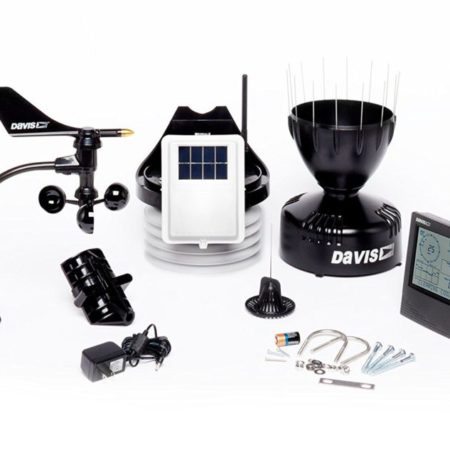
For current buyers, this review covers the 6252 wireless package with the WeatherLink Console. Owners of the older 6152 package should use the legacy-console section below. The existing product photographs show legacy equipment, not the current touchscreen package.
Still deciding between Davis families? Start with our Vantage Vue versus Vantage Pro2 guide. This page concentrates on Pro2 equipment, installation and ownership.
What comes with the current 6252?
The Davis 6252 product page identifies a wireless outdoor sensor suite and the 6313 WeatherLink Console. The standard package includes a passive radiation shield; solar-radiation and UV sensors are optional.
| Component | What it does |
|---|---|
| Outdoor temperature/humidity sensor | Measures conditions inside the radiation shield |
| Cup anemometer and wind vane | Measure wind speed and direction; can be mounted separately |
| Rain collector | Measures collected rainfall using a tipping spoon |
| Outdoor transmitter and solar power system | Send sensor data by radio to the console |
| WeatherLink Console | Displays observations and history; includes indoor temperature, humidity and pressure measurements |
The outdoor sensor-to-console connection is radio, not Wi-Fi. The console uses Wi-Fi for online services. A mounting pole or tripod is a separate purchase; choose the installation before ordering hardware.
Understand WeatherLink costs before buying
The console can receive local observations, store history and display graphs without a paid cloud plan. Local operation still depends on power and sensor reception. Remote access requires an internet connection and a WeatherLink account; internet forecasts are separate from measurements made by your sensors.
Exporting data from WeatherLink.com requires Pro or Pro+. The console’s microSD slot is not a user data-export feature, and the console does not use the old WeatherLink PC-software workflow. Review the console FAQ and current WeatherLink plans before buying for spreadsheet or research work. Cloud and third-party upload intervals also depend on the service tier.
If the standard wireless kit meets your needs, check the Davis 6252 with WeatherLink Console on Amazon (paid link). This is the complete package, not a console-only listing. Budget separately for mounting and any paid data features you need; check the seller’s current terms.
Why the separate wind sensor matters
The included anemometer cable lets you place wind measurement up to 40 feet from the rest of the suite. That is useful when the clearest wind exposure is not the best accessible position for rainfall and temperature measurements.
This flexibility can suit a larger property, farm monitoring or a permanent school installation. It also means more cable routing and mounting work than an integrated array. Moving the wind sensor does not turn it into a separately powered wireless sensor.
Follow the Pro2 sensor-suite manual, keep the collector level and plan safe maintenance access. Our Sensor Siting Checklist helps identify residential compromises; the broader installation guide supplies additional context. Model-specific instructions take precedence.
Measurements, reporting and power limits
Davis specifies outdoor temperature measurement from −40°F to 150°F, and wind speed up to 200 mph. These are measurement ranges, not guarantees that equipment survives every condition within them.
The 6252-family specification sheet separates update intervals: wind about 2.5–3 seconds, outdoor temperature 10–12 seconds, rainfall 20–24 seconds, and outdoor humidity 50 seconds–1 minute. These are not promises of equivalent cloud refresh. Displayed current values, stored records and internet uploads serve different purposes.
The advertised radio range is up to 1,000 feet line of sight. Buildings and obstructions reduce practical reception; test the intended locations before permanent mounting.
The suite uses solar power, a capacitor and a lithium backup battery. The console uses its power adapter and internal backup battery. Neither arrangement guarantees uninterrupted monitoring through a prolonged outage.
Expansion: choose a specific need
The 6252’s passive shield is distinct from the 6253 fan-aspirated package. 6262/6263 Pro2 Plus packages add solar and UV measurement. Fan aspiration may help with radiation-related temperature error, but it does not guarantee perfect readings.
Soil moisture and leaf wetness require the appropriate separate Davis transmitting equipment and probes; they are not included in 6252. The suite manual documents the 6345 leaf/soil station. Confirm the receiving console, regional radio version and exact sensor arrangement before buying. Expansion is useful when you have a measurement question—not a reason to collect accessories.
Legacy 6152 owners: identify the console first
The original article reviewed 6152 with the classic LCD console. It must not be relabeled as a 6252 touchscreen kit. Likewise, 6152C is a cabled configuration, not a wireless 6252 with a cable mode.
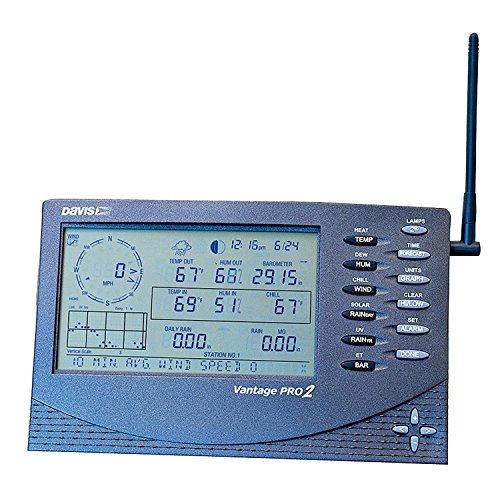
A compatible wireless Pro2 suite can be used with a 6313 WeatherLink Console. Confirm your hardware and regional frequency first, especially if you own a cabled system or a different Davis generation. A console upgrade does not replace worn outdoor sensors.
If that compatibility check supports your upgrade, check the 6313 WeatherLink Console on Amazon (paid link). This is the console only, not a complete station. The paid-export limitations above still apply. Keep a working legacy logger workflow if it better meets your data-access needs.
For Weather Underground, the current WeatherLink pathway passes through the online service; Wi-Fi alone does not register a station there. Our Weather Underground connection guide explains the service, gateway and legacy distinctions.
Maintenance and storm limitations
Self-emptying rain collection does not mean maintenance-free operation. Inspect for debris, keep the shield and solar panel clean, and follow the suite manual’s cleaning precautions. Davis specifically says not to lubricate the anemometer shaft or bearings. Its service and repair options are a practical ownership benefit, not a promise that every failure is repairable.
Pro2 is not lightning-proof or guaranteed to survive extreme weather. Davis warns that lightning can damage equipment; its warranty excludes lightning damage. Proper installation and grounding do not guarantee survival or personal safety.
For the 6313, Davis says the main Display screen must be open for its audible alarm to sound. Threshold alarms supplement awareness; they do not replace official warnings or establish safe outdoor conditions. Follow NWS lightning guidance: seek shelter when thunder is heard and remain sheltered for at least 30 minutes after the last thunder.
Is Pro2 the right purchase?
Choose it for the siting flexibility, documented expansion and serviceable system—not an unsupported accuracy ranking. Consider the hardware, installation and ongoing data costs together. For a simpler integrated Davis station, see our Vantage Vue review; for broader choices, use the home weather-station buying guide.