The Newentor Q3 is a desktop indoor/outdoor temperature and humidity monitor for people who want local readings without opening an app. This review covers the black Q3 package linked by the original article: Amazon ASIN B0836CM7KY, model Q3-BLACK. It includes one remote sensor—not three. Three is the maximum number of supported remote channels.
Its wireless connection is sensor-to-display radio, not Wi-Fi. Choose it for checking conditions around your home; look elsewhere if you need rainfall totals, wind measurements or remote phone access. This is a documentation-based assessment, not a hands-on test.
As an Amazon Associate I earn from qualifying purchases. If you buy through links on this page, I may earn a commission at no extra cost to you.
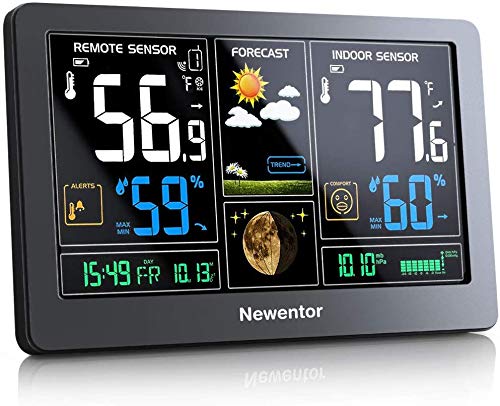
Check the black Newentor Q3 one-sensor package on Amazon (paid link). Confirm the selected sensor quantity and seller before ordering. Newentor’s product specifications provide a separate manufacturer reference.
Who is the Q3 for?
The Q3 suits a household that wants an indoor reading alongside a sheltered outdoor reading on one console. Its value depends on that simple job being the one you need done. A color display and extra icons do not turn it into a full outdoor weather station.
It does not replace a weather service, measure rain or wind, or provide an app/cloud account for checking conditions away from home. If those are purchase requirements, compare the different equipment described in our Ambient Weather WS-2902 review.
What’s included—and which model is this?
The linked black package contains the console, one remote sensor, power adapter and instructions. Additional-sensor bundles are sold separately; verify the package rather than treating every Newentor listing as identical.
The Q3 name is still used for a currently marketed product. That does not prove every internal revision or regional clock version is identical to a unit bought years ago. The instructions below concern the US Q3/WWVB documentation. Check older equipment against its own controls. Q5, Q7 and other Newentor names identify different products, not interchangeable Q3 labels.
Features and limitations
- Local readings: indoor/outdoor temperature and humidity, high/low records and a pressure display.
- Remote channels: up to three compatible sensors, with channel selection or cycling on the console. This is not three simultaneous outdoor display panels.
- Placement: the manufacturer rates transmission at up to 200 feet in an open area. Walls, metal and the installation environment reduce usable range; it is not a guaranteed distance through a house.
- Clock and alerts: US atomic-clock reception uses WWVB. Clock alarms and local temperature alerts are not phone notifications or official emergency warnings.
Keep the outdoor sensor sheltered from direct sun and rain, with airflow around it. Avoid warm walls and artificial heat sources. Our Sensor Siting Checklist explains the general placement principles; the Q3 sensor’s protection requirements still apply.
Manual, setup and sensor pairing
Use the US Q3 manual, particularly its initial-operation and remote-transmission sections.
- Power the console with its supplied adapter or two AA batteries. The sensor also takes two AA batteries; batteries are not included.
- Select a sensor channel and match it on the console. Give additional sensors different channels.
- If readings are missing, check battery polarity, channel selection and distance first. Then hold the console’s DOWN button for three seconds to restart reception and press TX on the sensor.
Try re-pairing before replacing equipment. Do not substitute a factory-reset procedure for a different Newentor model. Newentor’s troubleshooting sheet also covers missing readings and channel cycling.
Backlight, clock and forecast help
Backlight: the adapter allows sustained illumination; battery operation lights the backlight briefly, about 15 seconds. A dark screen while plugged in can also reflect the brightness setting or a WWVB search. The manufacturer describes a roughly seven-minute dimming period during clock reception.
Clock: choose the correct time zone and daylight-saving setting. Reception depends on location and interference, so set the time manually if necessary. The documented US version offers Pacific, Mountain, Central and Eastern settings; do not assume worldwide automatic time support. The older Q3 manual describes a five-minute snooze, not the previous article’s 30-minute sleep timer.
Forecast and pressure: Newentor describes a 12–24-hour outlook and a 7–10-day initial settling period. Neither establishes a guaranteed accuracy rate. The icons indicate a pressure-based outlook, not observed rainfall or a rain-probability percentage. Newentor’s troubleshooting sheet explains that the pressure reading is absolute pressure, whereas many weather services show a sea-level-adjusted value. A difference alone does not establish a fault. Use your local weather service for planning and official warnings.
Replacement sensors and buying decision
The Newentor sensor listing B0836F4QXS explicitly identifies compatibility with station ASIN B0836CM7KY. It was unavailable when checked, so there is no verified currently purchasable replacement-sensor recommendation here. Do not substitute a Q7/Q8 sensor based on appearance or brand.
For a failed sensor, contact Newentor with your console model, sensor label and order details before ordering a substitute. The manual also lists service@newentor.com.
The Q3 remains a reasonable product to consider for local temperature/humidity monitoring when its display, power arrangement and sensor limits fit your needs. We have not independently established its long-term reliability or a superior accuracy ranking. Buyers who require expandable monitoring should confirm replacement-sensor supply before committing to the system.