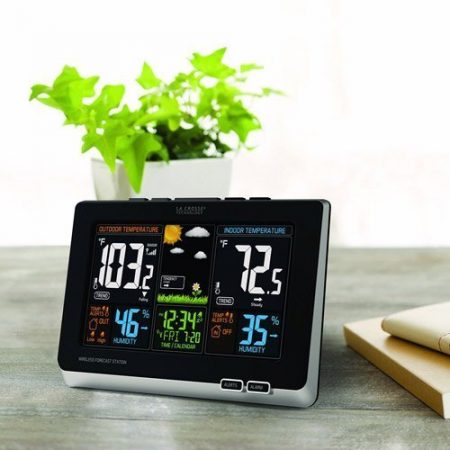
The La Crosse 308-1414B is an indoor/outdoor temperature-and-humidity station with a local color display. This guide helps existing owners identify their hardware, find the right instructions and troubleshoot missing outdoor readings. Its sensor uses radio communication—not Wi-Fi—and this is not a La Crosse View app-connected station.
The original model is retired, but La Crosse still provides documentation and compatible parts. The 308-1414B-INT name also appears in retail listings; it is not enough to identify the hardware revision. Check the label on the back of your display before following a procedure.
This guide is based on manufacturer documentation, not personal hands-on testing. As an Amazon Associate I earn from qualifying purchases. Shopping links marked “paid link” may earn us a commission at no additional cost to you.
Featured image: Legacy La Crosse 308-1414B display. Similar-looking later revisions require their own instructions.
Identify your model and manual first
| Label or reference | Which information to use |
|---|---|
| Original 308-1414B | The original B instructions below and La Crosse’s original-model support page. |
| 308-1414BV2 | Use the V2 setup guide. Do not assume the original power-up sequence applies. |
| 308-1414BV3 | Use the V3 product/support page. This later version is currently offered by La Crosse. |
| 308-1414B-INT on a listing or receipt | Check the actual display and sensor labels. Retail naming alone does not establish original, V2 or V3 hardware. |
For an original B, the manufacturer’s archived instruction manual, DC 020816 is the relevant starting point. This Amazon-hosted document contains multiple manuals: use PDF pages 2–9, headed 308-1414W/308-1414B, not the C85845 section that follows.
There is a documentation trap: the original B product page currently links to a V2 setup guide. The original manual starts with display power; the V2/V3 guides start with sensor batteries. Match the document to your hardware instead of combining the sequences.
Initial setup: original 308-1414B
- Connect the supplied 5V adapter to the display and wall outlet. Three AAA batteries are optional backup.
- Install two AA batteries in the outdoor sensor, observing polarity.
- Allow five minutes for reception before moving the sensor to its outdoor location.
Keep the display indoors. Continuous backlighting needs adapter power; battery-only lighting is temporary. Use HI/LOW/OFF to change brightness when plugged in.
For the original sensor configuration, La Crosse’s model-specific troubleshooting document permits lithium batteries below −20°F. The advice is not to replace lithium with alkaline in extreme cold. Follow the instructions supplied with any replacement sensor; replace batteries as a matching set.
Outdoor readings missing? Try reconnection first
Check sensor batteries and display power before resetting anything. For an original B that has lost its sensor, bring the units indoors, 5–10 feet apart. Hold HEAT/DEW until sensor search starts, then press and release the sensor’s TX button. Allow a few minutes for readings to return.
This is a sensor search, not a factory restart. There is no documented multi-channel selection step for this original single-outdoor-sensor setup; do not import a channel-1/2/3 procedure from a different station.
If it reconnects indoors but fails at its normal location, investigate placement and obstructions before buying parts.
Factory restart: original B, only if needed
Save settings and any readings you want to retain first. La Crosse describes this procedure as clearing memory and restoring defaults. Expect to reconfigure the station; it is more consequential than sensor search.
- Disconnect adapter power and remove batteries from both units.
- Press a display button at least 20 times; confirm the screen is blank.
- Leave both unpowered for 15 minutes.
- Restore adapter power to the display, install fresh sensor batteries and press TX.
- Keep them 5–10 feet apart. After readings return, leave both untouched for another 15 minutes.
Use the revision-specific manual for V2/V3 equipment rather than applying this original-B restart automatically.
Time, records and alerts
- Time/date: Hold TIME SET to enter settings; arrows change values and TIME SET advances. Check time zone and daylight-saving settings.
- Atomic time: The documented US hardware uses WWVB. “INT” is not evidence of DCF/MSF support. Outside WWVB coverage, use manual time setting unless your exact manual documents another system.
- Reception: NIST’s WWVB guidance explains why reception is generally better at night. Move the display away from interference. An hour error often calls for a time-zone/DST check, not a sensor reset.
- Records: Up shows maxima; down shows minima. Daily records reset at midnight, so note important readings before then.
- Alarms: Time alarms and temperature thresholds are separate. Setting a threshold does not itself arm its alert; check the alert bell. Use the original manual’s ALARM and ALERTS sections for the button sequence.
Forecast icons and sensor placement
The temperature/humidity readings describe the sensors’ surroundings. Forecast icons are pressure-based estimates, not observations of approaching rain or official warnings. They should not determine severe-weather decisions.
La Crosse’s documents give different forecast learning periods. Allow the display to settle and use your matching manual; do not treat a calibration interval as a guarantee of forecast accuracy.
The original product page specifies up to 300 feet of sensor range. That is a radio-link specification under favorable conditions, not a reliable through-house distance. Later sensor literature quotes 330 feet; it does not establish an upgraded range for every original display.
Mount the sensor vertically in a shaded, sheltered location with airflow. Sun-heated surfaces can distort readings; walls and metal can obstruct reception. The sensor is weather-resistant, not waterproof. Our Sensor Siting Checklist helps balance measurement quality and practical placement.
This station does not measure rainfall or wind speed. For broader context, see our weather-station guide.
If the outdoor sensor needs replacing
La Crosse explicitly lists TX141TH-BV4 among the original 308-1414B’s replacement parts. Its sensor page documents TX141TH-B-series interchangeability; its instructions explain replacement pairing. This is a temperature/humidity sensor, not a replacement display or complete station.
After battery, placement and reconnection checks, owners of the applicable documented 308-1414B configuration can check the TX141TH-BV4 replacement sensor on Amazon (paid link). Confirm both hardware labels before ordering, particularly if your receipt says only B-INT. Similar appearance or 433MHz alone does not prove compatibility.
If the display label does not match, use La Crosse support before buying. Our S84107 and C84428 resources cover those different models; their parts and reset instructions should not be transferred to this one.