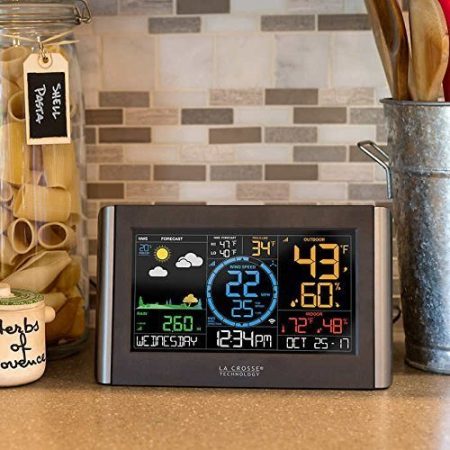
Original C84428 display; this guide covers the retired package.
The La Crosse C84428 is a retired weather station with three separate outdoor sensors and optional La Crosse View connectivity. Existing owners can still find its original instructions and manufacturer support. You do not need Wi-Fi for basic local readings, but you do need the display’s power adapter: its backup batteries do not keep sensor updates running.
This guide covers the original C84428 package, sold as the “5-in-1 Professional Wireless Weather Station.” Check the model label on your display and the labels on each sensor before following instructions or buying parts. Similar-looking La Crosse equipment can use different components.
This is a documentation-based owner guide. We have not personally tested this station or its replacement parts.
Identify your C84428 hardware
The original package uses separate receivers and transmitters—not one outdoor all-in-one array.
| Component | What it does | Power |
|---|---|---|
| C84428 main display | Shows outdoor readings; measures indoor temperature/humidity | Required 5V adapter; optional three AA batteries retain time/date |
| LTV-TH2 | Outdoor temperature and humidity | Two AA batteries |
| LTV-W1 | Wind speed; does not measure wind direction | Two C batteries |
| LTV-R2 | Rainfall collected by a tipping mechanism | Two AA batteries |
| LTV-D1 bonus display | Indoor readings, time and selectable outdoor temperature/humidity from the compatible sensor | Two AAA batteries; no La Crosse View connection |
The C84428 product/support page and original manual identify this hardware. The manual’s filename contains “c84228,” but the document itself is explicitly titled C84428.
Local readings versus Wi-Fi and the app
The outdoor sensors transmit by 915MHz radio to the main display. The display can separately connect to a 2.4GHz Wi-Fi network and La Crosse’s internet service for app access and connected features. Sensor radio range is not Wi-Fi range.
The original documentation specifies roughly 400 feet in open air for sensor communication. Walls, metal, vegetation and interference reduce usable range; test reception at your intended locations before permanent mounting.
Standalone readings include temperature, humidity, wind speed and rain totals. “Feels like” and dew point are calculated values. Connected forecast information and prevailing wind direction come through the service; they are not measurements from a wind vane on the LTV-W1.
La Crosse View offers a free service tier. Extended history and some notification/export features require La Crosse View Plus. App operation depends on power, internet connectivity, the service and phone settings. The original manual’s screenshots and mobile operating-system requirements are historical; follow current app prompts.
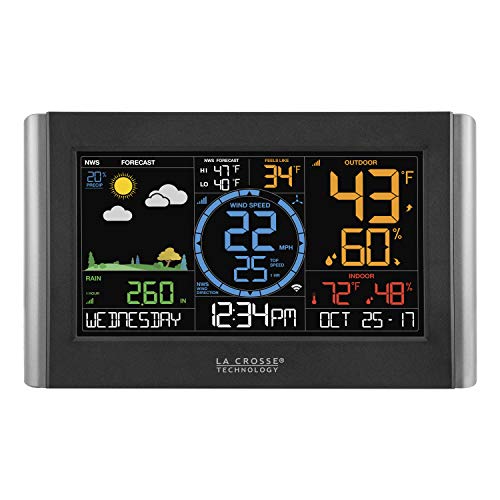
Set up local readings first
- Install fresh batteries in each outdoor sensor, observing polarity. Plug the proper adapter into the main display. Add backup batteries if desired.
- Keep the sensors and display within about 10 feet of each other for several minutes while readings establish. This is a setup distance, not the operating-range specification.
- For standalone time and settings, hold SET for three seconds. Use + / − to adjust values and SET to advance. LIGHT exits. The main station receives internet time when connected; do not use another model’s WWVB instructions.
- Position the sensors separately: shaded and ventilated temperature/humidity sensor; level, accessible rain collector away from overhead drips; upright wind sensor with the clearest safe exposure available. See our Sensor Siting Checklist for practical compromises.
Press LIGHT to change the main display’s five brightness levels. The manual documents manual brightness adjustment; do not assume it has a scheduled automatic dimmer.
For optional remote access, use the current C84428 Wi-Fi instructions. Connect through a 2.4GHz network, keep the display on adapter power, and follow La Crosse View’s account/device setup. Hold + and − together for three seconds to start a Wi-Fi search when needed. Outdoor sensors may also need to be added by their individual barcode/device IDs in the app.
Missing readings: check the right connection
Dashes on the main display: check the affected sensor’s batteries, then test it near the display. Press SENSOR to view IDs and hold SENSOR for three seconds to search. Allow several minutes. Check that the displayed ID matches your sensor before moving it back outside gradually.
Local readings work, but the app is stale: investigate the display’s adapter, router/internet connection, Wi-Fi status and app device registration. Replacing an outdoor sensor is not the first response to a cloud connection problem.
Wind reads zero: the manufacturer distinguishes zero from disconnected dashes. Check whether the cups move freely and whether debris or ice is preventing movement. Do not climb to service equipment in hazardous conditions.
Rain seems low: check that the funnel is clear, the collector is level and the rocker moves freely. The C84428 troubleshooting document includes a repeatable tip test. Record existing totals before testing because added water contributes to the reading. It instructs owners not to oil the rain sensor.
Incorrect temperature: check exposure to sunlight, walls, vents and other heat sources before assuming the electronics have failed. A difference from a distant weather report does not by itself prove either reading wrong.
Replacement parts: display compatibility matters
Check the main display model first. “La Crosse View compatible” can mean app access only.
| Part/path | C84428 owner guidance |
|---|---|
| LTV-TH2 or LTV-TH5i | Manufacturer lists these for temperature/humidity on the C84428 display; confirm the exact part before ordering |
| LTV-W1 | Listed display-compatible wind sensor; check current manufacturer availability and exact SKU |
| LTV-R2 | Original rain sensor is retired; ask La Crosse about replacement options. LTV-R3/R3V2 are not fully interchangeable |
| LTV-W2 / LTV-W3 and other app-only additions | The C84428 parts page classifies these as pass-through to the app; do not buy them expecting replacement wind readings on the C84428 LCD |
| Power adapter / main display | Use the exact adapter listed under C84428 parts. Ask support about a replacement display; do not assume a similar console is interchangeable |
No sufficiently verified current Amazon repair destination is recommended here. Manufacturer parts/support links are provided instead.
Replace a sensor or reset the station
For a verified replacement, remove the old sensor’s batteries. Press SENSOR until its ID appears, then hold − for five seconds to delete that ID. Install batteries in the replacement and allow it to connect. The original TH2 has a TX button; the original rain and wind sensors do not. This targeted procedure avoids resetting the whole station.
Before a factory reset: it erases sensor IDs, Wi-Fi settings and history records, returning the station to default settings. Save readings you need and be ready to reconnect Wi-Fi and sensors. Try battery, placement and connection checks first.
For C84428 specifically, hold RAIN and LIGHT together for five seconds. Let the station reacquire its sensors and then reconnect through the app if used. The manual mentions three minutes; the FAQ advises allowing at least ten after a factory reset. Do not repeatedly reset while it is reconnecting.
Forecasts and the station’s limits
The rain collector measures fallen rain; it does not predict future rainfall amounts. Standalone forecast icons use pressure trends, while connected forecast fields use downloaded information. The original C84428 documentation describes NWS-labelled fields; a service’s current presentation should not be inferred from another La Crosse model.
Neither local observations nor forecast icons guarantee advance warning or establish that outdoor conditions are safe. Keep official forecasts and emergency alerts available. NWS lightning guidance says to seek safe shelter when you hear thunder and remain sheltered for at least 30 minutes after the last thunder.
For unresolved faults, use La Crosse customer support with your display model, sensor model and the symptoms. If your label instead says S84107, use our separate S84107 owner guide; its hardware and procedures differ.