Choose a Davis weather station around where you can install its sensors and how you want to use the data. Vantage Vue offers an integrated outdoor unit; Vantage Pro2 lets you position the wind sensor separately and offers more sensor-suite options. Neither is universally the better purchase.
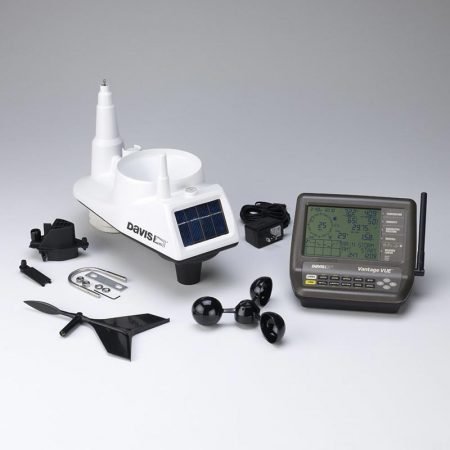
For current wireless packages, the starting points are Vantage Vue 6242 and Vantage Pro2 6252, both with the WeatherLink Console 6313. Older listings and owner manuals use different package numbers. The opening photograph shows a legacy Vantage Vue with its original LCD console; it does not show the current 6242 package.
As an Amazon Associate I earn from qualifying purchases. If you buy through links on this page, I may earn a commission at no extra cost to you.
The practical Vue-versus-Pro2 decision
| Buying consideration | Vantage Vue 6242 | Vantage Pro2 6252 |
|---|---|---|
| Outdoor layout | Wind, rain, temperature and humidity in one integrated suite | Wind sensor can be mounted separately from the main suite |
| Installation trade-off | Fewer separate mounting locations, but one location must serve different measurements | More siting flexibility, with cable routing and additional mounting work |
| Standard measurements | Outdoor temperature/humidity, wind and rainfall; indoor readings and pressure at the console | Same core categories; separate wind placement may better suit the property |
| UV/solar options | Not additions to the Vue outdoor suite itself | Documented optional sensors; Plus packages include UV and solar radiation |
| Console | WeatherLink Console 6313 | WeatherLink Console 6313 |
| Relative hardware cost | Lower-priced entry into these two Davis packages | Higher initial cost; budget for the installation you actually need |
This comparison follows the Vue specifications and Pro2 specifications. Both use self-emptying tipping-spoon rain collectors; collector size and installation differ. That does not establish a universal accuracy winner.
For wind exposure, the Pro2’s included anemometer cable permits separation of up to 40 feet from the main suite. It is still a wired connection between those components: the wireless link is from the transmitting suite to the console. Vue’s wind sensor stays with its outdoor suite. Our wind-measurement explanation and Sensor Siting Checklist explain why location matters.
Understand WeatherLink costs before choosing a package
The WeatherLink Console receives compatible local sensors directly and displays/stores observations without requiring Wi-Fi or a WeatherLink account. With power and sensor reception maintained, losing internet access does not stop those local observations. It does interrupt online services.
Wi-Fi, internet access and a WeatherLink account are needed for cloud sharing and remote access. Built-in Wi-Fi means these packages do not also require WeatherLink Live just to upload data.
Local history on the console is not the same as exporting files to your computer. Davis’s console FAQ specifies WeatherLink.com Pro or Pro+ for cloud data export. The console’s microSD slot is not an owner export mechanism, and the console does not connect to legacy WeatherLink PC software as a USB logger does.
Basic online current-condition viewing is available without a paid plan; historical cloud analysis/export and other advanced features depend on the plan. Check Davis’s current WeatherLink plans before buying if spreadsheet projects, historical remote analysis or service intervals matter. A hardware purchase is not a promise of lifetime paid cloud features.
Choose Vue 6242 for an integrated installation
Vue makes sense when a suitable single mounting location and the core weather measurements meet your needs. It simplifies the physical layout, but does not eliminate siting compromises or maintenance. Keep the rain collector clear, inspect the equipment and choose a mounting position you can service.
The current 6242 package combines the 6357 outdoor suite with the 6313 WeatherLink Console. It is not the old 6250 LCD-console package and not a sensor-only purchase. Check regional compatibility before importing equipment or combining it with existing Davis hardware.
See Davis’s current 6242 package, or check the Davis 6242 Vantage Vue with WeatherLink Console on Amazon (paid link). Budget separately for mounting and any paid WeatherLink features you need.
For console differences, legacy upgrades and detailed owner context, use our Vantage Vue 6250/6242 review.
Choose Pro2 6252 when separate wind siting matters
The standard 6252 is a wireless Pro2 suite with a passive radiation shield and WeatherLink Console. Its separately positionable anemometer is the central reason to consider it over Vue—not an unsupported promise that every reading is more accurate.
Expansion needs deserve a package check. The current 6253 includes 24-hour fan aspiration; 6262 adds UV and solar radiation with passive shielding; 6263 combines Plus sensors and 24-hour aspiration. These are different packages, not features included in every 6252. Soil/leaf measurements require appropriate additional equipment and compatibility checks; they are not built into the standard suite.
See Davis’s standard 6252 package, or check the Davis 6252 Vantage Pro2 with WeatherLink Console on Amazon (paid link). The cloud/export qualifications above apply here too; separate mounting may add expense.
Already own a Davis station?
| Number on the package or product | What it identifies |
|---|---|
| 6250 | Legacy Vue package with original LCD console |
| 6152 / 6152C | Legacy Pro2 wireless / cabled package terminology; verify the actual components |
| 6242 / 6252 | Current Vue / standard wireless Pro2 packages with WeatherLink Console |
| 6313 | WeatherLink Console only—not a complete station |
| 6357 / 6322 | Vue / standard wireless Pro2 sensor suites—not complete console packages |
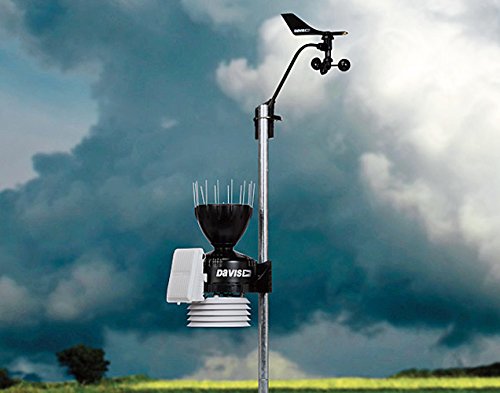
Cabled Pro2 equipment is a distinct architecture. Davis’s sensor-suite manual documents a cable connection to compatible cabled receivers; a wireless 6252 does not become cabled simply by selecting a setting. Do not assume the 6313 accepts a cabled suite directly.
Our separate 6152 Pro2 review concerns the older package; use it as legacy context, not the specification sheet for 6252. Keep a functioning legacy logging workflow in mind before buying a new console. For internet upload paths, see the Weather Underground connection guide.
Match the station to the property—not a durability slogan
Davis specifies wireless range under favorable conditions, not guaranteed reception through every building or tree. Test reception and follow the model manual before permanent mounting. Our installation guidance provides broader planning context; model instructions take precedence.
For purpose-specific decisions, see the farm guide, school guide or garden-monitoring guide. A local station adds observations; it cannot certify safe spraying conditions, safe outdoor school activities or protection from an approaching storm.
Neither family is lightning-proof. Follow official warnings and NWS lightning safety guidance; seek shelter when thunder is heard. Choose Vue for a workable integrated installation, or Pro2 when its extra siting flexibility and documented options solve a real need.