
The Ambient Weather WS-2000 makes sense when you want weather observations on a dedicated screen, local records for spreadsheet work and additional sensors around your property. Its main attraction over the WS-2902D is the console and expansion capability—not a promise that every measurement is more accurate.
This is a documentation-based evaluation, not a report of hands-on testing. The existing photographs illustrate WS-2000 equipment and an older Ambient Weather Network interface; they do not establish the firmware or every accessory in a current package.
As an Amazon Associate I earn from qualifying purchases. If you buy through links on this page, I may earn a commission at no extra cost to you.
What comes with the WS-2000?
Ambient currently lists the complete package as WS-2000. It combines a TFT colour console, an Osprey outdoor array and a separate WH32B indoor temperature/humidity/barometric-pressure sensor. The array measures wind, outdoor temperature/humidity, rain, UV and solar radiation. Those measurements are not seven separate optional transmitters.
The package includes the console’s power adapter and array mounting hardware. Budget separately for a suitable mounting pole, batteries and an optional memory card. Use Ambient’s current package information alongside the WS-2000 manual when checking the box contents.
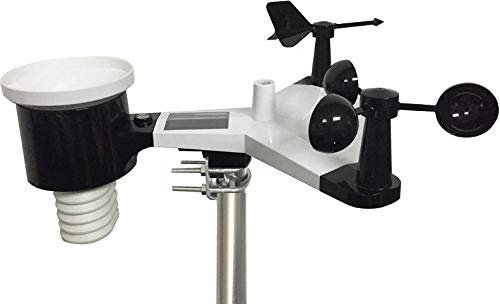
The console requires its adapter. The array uses solar power with battery backup; the indoor transmitter also needs batteries. This does not make the complete system independent of household power.
Why choose it over WS-2902D or WS-5000?
- Choose WS-2902D when basic weather observations and online access are enough. Its supported extra sensors pass data to AWN rather than appearing on the console. Our WS-2902 generation guide explains the current D package and older hardware.
- Choose WS-2000 when viewing compatible extra sensors locally and exporting observations are worth the higher cost. A room, greenhouse or garden can have different conditions from the main array’s location.
- Consider WS-5000 when you want ultrasonic wind measurement and a separate rain gauge that can be positioned independently. Its higher price buys a different outdoor sensor arrangement; it does not remove siting or maintenance requirements. See Ambient’s WS-5000 specification.
The WS-2000’s integrated array makes installation straightforward to plan, but wind, temperature and rain must share one location. Work through the Sensor Siting Checklist before deciding whether that compromise fits your property.
The console and local records
The button-operated display provides light and dark backgrounds, records, graphs and calculated values such as dew point and heat index. Those calculated values should not be confused with additional physical sensors.


An optional microSD card supports CSV records for spreadsheet analysis. It is not included as standard. For additional-channel history, follow Ambient’s recording and support guidance: the card needs to remain inserted for those records, rather than assuming every channel is retained in internal memory.
The console’s pressure-based forecast icon is a limited trend estimate, not an official forecast or severe-weather warning.
What compatible expansion actually gives you
Buy sensors for a specific location or question, rather than treating every accessory as necessary. Compatibility depends on the exact Ambient model and appropriate console/Wi-Fi firmware; a similar-looking sensor from another brand is not sufficient evidence.
- Extra rooms or a greenhouse: WH31E temperature/humidity sensors share an eight-channel group with compatible WH31P probes. Site outdoor sensors appropriately; an exposed sensor is not automatically a representative air-temperature measurement. If you need an additional monitoring point, check the WH31E on Amazon (paid link).
- Garden soil: WH31SM provides moisture readings with soil-specific calibration on WS-2000. It does not measure soil temperature or independently decide when every plant needs watering. If that measurement would help, check the WH31SM on Amazon (paid link). Ambient’s pages disagree on the maximum channel count; confirm your console/firmware limit before planning a large installation.
- Pool temperature: WH31PF is a compatible floating thermometer. Ambient specifies a sealed, finite-life design and warns against keeping it submerged beneath a cover; its suggested alternative for covered pools is WH31P.
- Air particles and lightning: Ambient documents PM25/PM25IN particulate sensors and the optional WH31L lightning detector. These are separate purchases. Ambient explicitly excludes WH31L from personal/public safety use and warns of missed strikes and false alarms. It must not determine whether it is safe to remain outdoors.
If you only need a temperature reading indoors and outdoors, compare a simpler indoor/outdoor thermometer before buying this entire system.
Sensor radio, Wi-Fi and online services
The US array communicates with the console over 915 MHz radio. The console uses 2.4 GHz Wi-Fi to reach your router. The original article’s 80-foot restriction for all optional sensors confused these connections.
Ambient’s manual rates array reception at 300 feet unobstructed, with roughly 100 feet typical through ordinary barriers; its product page also uses 330 feet. Treat these as qualified manufacturer figures, not guaranteed coverage. Test reception at the intended locations before permanent mounting.
Enter Wi-Fi details through the console controls. Local observations do not depend on an AWN account, but remote AWN access requires internet connectivity and registration. Weather Underground setup uses the station’s supported upload path and WU credentials; no additional bridge is generally necessary.
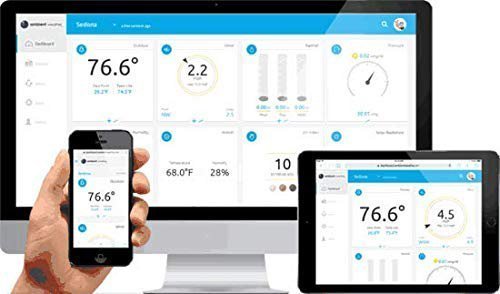
Home Assistant’s Ambient integration uses Ambient’s cloud and requires API/application keys. Its documentation also identifies a community MQTT route for local setups; that is a separate technical project, not an included plug-and-play feature. Alexa reporting and IFTTT-connected actions have different roles. Our home-automation guide explains the distinctions.
Do not buy it on a guaranteed Google Assistant promise. Ambient still has promotional references, but its Google integration notice describes the discontinued underlying method. Older SmartThings instructions also need the context in our Ambient/SmartThings guide.
Costs and buying checks
Standard local operation and AWN access are distinct from paid AWN+ features, including SMS alerts. A promotional trial is not a requirement for using the station. Check service terms and any IFTTT plan requirements for the actions you intend to use.
For the complete station, check the WS-2000 Advanced Console + Array package on Amazon (paid link). Select that package, rather than a base-console alternative or a differently priced subscription bundle. The manufacturer destination above remains useful for specifications and direct purchase.
Existing owners should consult Ambient’s firmware guidance for their console. Older units use memory-card updates; Ambient also documents Wi-Fi updating for newer consoles. Keep the rain collector and solar surfaces clean and plan access for battery changes.
The WS-2000 earns consideration for its display, local records and expansion. If those features do not solve your needs, use our home weather-station guide to compare the category rather than assuming a more elaborate station is automatically the right purchase.